
EnnoAI assistantProject management
Meet Enno: Noetic's personal project assistant
By Noah · 19 July 2026
Enno is Noetic's built-in AI assistant. It lives inside the iOS app and the web app as a chat interface — and it can do far more than answer questions.
You can ask Enno to create a project, add tasks, set due dates, reschedule meetings or reorganise your workload. It understands your entire workspace and each individual project. That means instructions do not need to start from scratch. Enno already has the context.
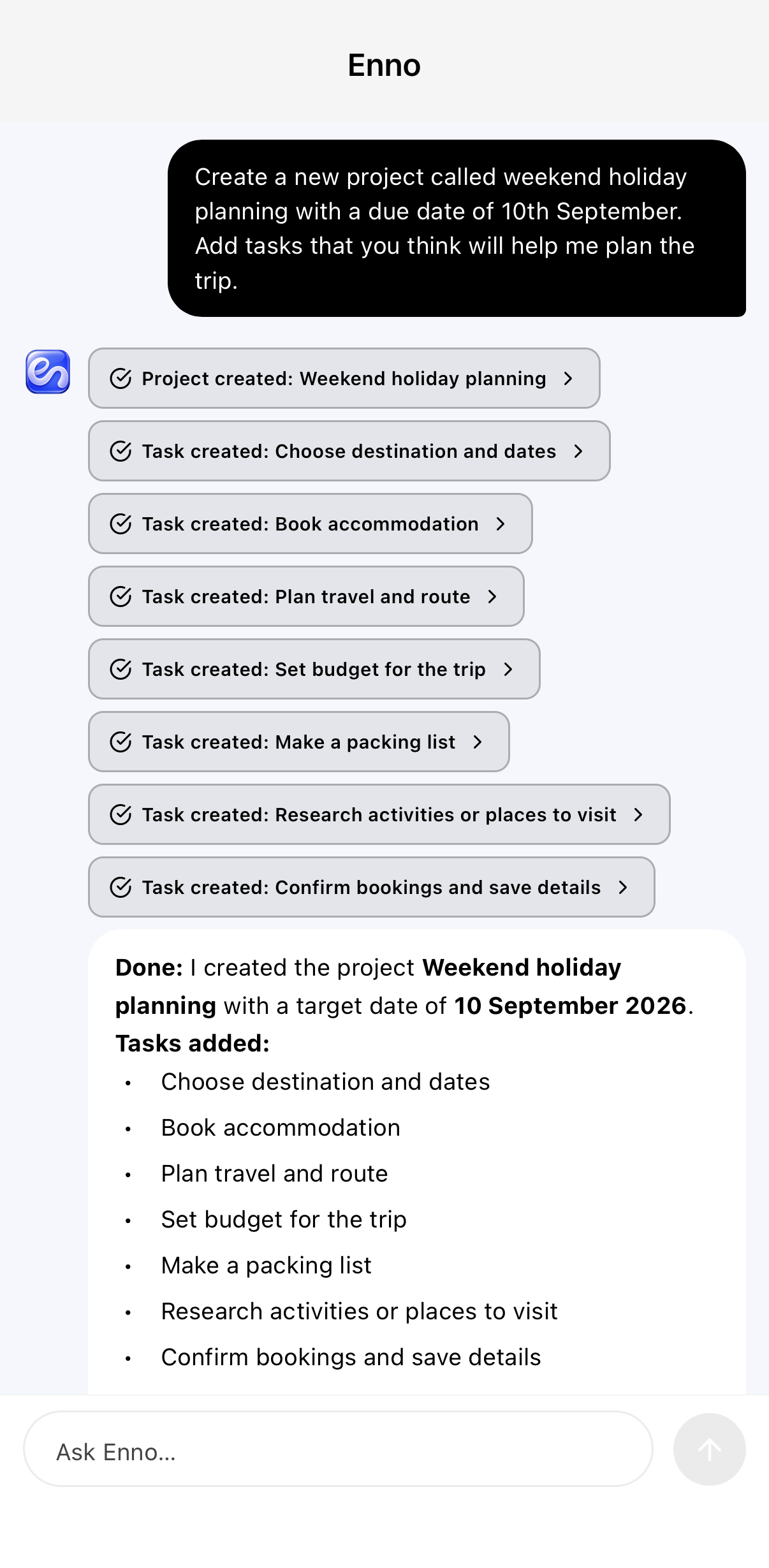 Enno creating a weekend holiday planning project with tasks
What Enno can do
Enno works across tasks, projects, meetings and documents. The range of things you can ask is wider than most AI assistants.
Task and project management: Enno can create, edit and delete tasks, build out full projects from a single instruction, set start and due dates, assign priorities, and move tasks between projects. You can ask what is overdue, what is coming up or what is waiting on someone else — and get a direct answer.
Calendar and meetings: Schedule and amend meetings, set reminders, adjust timings, and see upcoming commitments in the context of your real workload.
Document work and actual output: Enno can draft papers, essays, outlines and documents. It can brainstorm ideas and develop them into structured notes, write meeting notes and project briefs, and help with anything that requires real written output rather than just a list of suggestions.
Full contextual understanding
Most AI assistants work from scratch each time. Enno does not.
It has full contextual understanding of your entire Noetic workspace. It knows your active projects, their tasks, their deadlines and their notes. When you ask Enno something, it answers with that context already loaded.
At the project level, the understanding goes deeper still. Enno knows the brief, the history, the open tasks and the decisions that have been recorded. It can suggest next steps, flag conflicts or summarise where things stand — without you needing to explain the situation first.
This is what makes Enno useful not as a novelty, but as a practical working partner.
A full project assistant, not just a shortcut
There is a difference between an AI that saves you a few taps and one that does the actual work.
Enno is designed to do the actual work. Ask it to plan a project from scratch and it will build the structure — milestones, tasks, dates, notes — in seconds. Ask it to write the first draft of a document and it will use everything it knows about the project to produce something genuinely useful rather than something generic. Ask it to reorganise your week given a new deadline and it will work with what is already there.
The goal is not to automate you out of your work. It is to remove the friction between the decision you have made and the system that records it.
How to use Enno
Enno is available in both the iOS app and the web app as a chat interface embedded directly into Noetic.
There is no separate setup. You do not need to explain the context every time. Open the chat, ask what you need, and Enno already has everything it needs to help.
Some useful ways to start:
- "Create a project for [upcoming event] with the tasks I'll need."
- "What's overdue this week?"
- "Write a brief for [project name] so I can share it with the team."
- "Move everything due this Friday to next Monday."
- "Summarise where [project] is up to."
Enno is not a novelty feature. It is a working part of the system.
What this changes
Managing projects has always required two kinds of effort: the work itself, and the work of keeping the system up to date.
The second kind — adding tasks, moving dates, writing notes, updating records — is mostly administration. It takes time and attention that could go elsewhere.
Enno handles that administration when you ask it to. It does not replace your judgement about what matters. But it does mean the system can reflect your decisions immediately, without you having to carry every instruction manually through every field and form.
That is what makes it different from a to-do app with a chatbot bolted on. Enno is not an add-on. It is part of how Noetic works.
Noetic is available on the web and as a native iOS app, with Enno included.
Common questions
What is Enno?
Enno is Noetic's personal project assistant — an AI available in both the iOS and web app that can manage tasks, projects and meetings, write documents, and work with full context of your workspace.
Can Enno create tasks and projects?
Yes. Ask Enno to create a project and it will build the structure including tasks, dates and notes. You can also ask it to edit, move, delete or prioritise tasks across your workspace.
Does Enno understand the context of my projects?
Yes. Enno has contextual understanding of your entire Noetic workspace and each individual project, so it can give useful answers and take real actions without you needing to explain the situation each time.
One workspace for your projects, tasks and notes.
Noetic brings everything into one calm place — web and iOS app included in every plan. No feature gating.